Image & Deepfake / review
Best AI Image Detector in 2026 (Tested)
I ran real camera photos and AI images from ChatGPT and Midjourney through free AI image detectors. Here's what each one caught, what it showed me, and which one I'd use.
- tested on
- Nov 19, 2026
- test set
- 2 real · 3 AI images
- tools tested
- DeepfakeDetector.ai, Deploy Detect
- method
- Free tiers, no accounts
- verdict
- DeepfakeDetector.ai
QUICK ANSWER
DeepfakeDetector.ai is the best AI image detector for most people in 2026. It's free with no signup, it made the right call on every image in my test, and it was the only tool that read the original ChatGPT file and named OpenAI as the source. Deploy Detect (Hive's free detector) also got every image right and is a good second opinion, but it missed the Content Credentials that DeepfakeDetector.ai found.
1. How I Tested
I used five images. Two were real photos and three were AI.
Real photos (both from Wikimedia Commons, shot on real cameras):
- Metro station: a black and white shot of a São Paulo metro station, taken on a Nikon D300.
- Market: chickens hanging in a market stall, taken on a Canon EOS 20D.
AI images:
- Midjourney: a tulip field and windmill scene from 2023, labeled as Midjourney on Wikimedia Commons.
- ChatGPT, copy: a casual balcony photo of mint tea and basbousa, made with ChatGPT’s free plan, then re-saved as a JPEG.
- ChatGPT, original: the same balcony image, but the untouched PNG straight from ChatGPT, with its Content Credentials still inside.
One detail matters a lot here. Four of the five images were re-saved copies, which strips the metadata a camera or AI tool writes into the file. That’s what happens to almost every image you find online after it passes through a social app, a messaging app or a screenshot. It forces the detectors to judge the pixels alone. The fifth file, the original ChatGPT PNG, tests the other half of the job: can the tool read what the file says about itself?
I tested only free, public versions and didn’t create any accounts. When a tool hit a sign-up wall, I’ve said so below. My full method is on the How I Test page.
2. The Results at a Glance
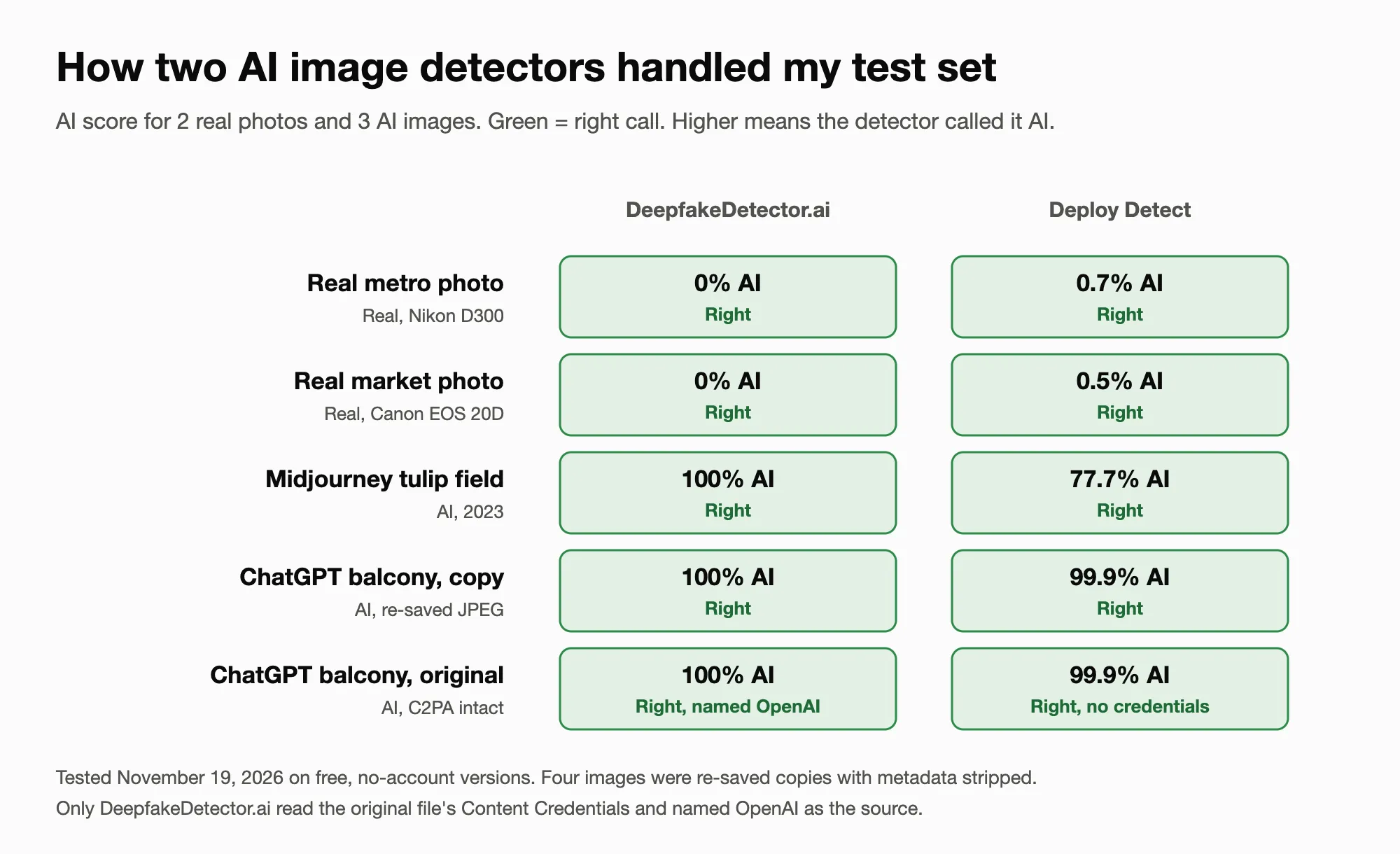
Green means the detector made the right call. Tested November 19, 2026.
Here’s every result, image by image:
Real metro photo
- DeepfakeDetector.ai: Human, 0% (right)
- Deploy Detect: 0.7% AI (right)
Real market photo
- DeepfakeDetector.ai: Human, 0% (right)
- Deploy Detect: 0.5% AI (right)
Midjourney tulip field
- DeepfakeDetector.ai: AI Generated, 100% (right)
- Deploy Detect: 77.7% AI, top guess Midjourney (right)
ChatGPT balcony, re-saved copy
- DeepfakeDetector.ai: AI Generated, 100% (right)
- Deploy Detect: 99.9% AI, top guess GPT Image 2 (right)
ChatGPT balcony, original file
- DeepfakeDetector.ai: AI Generated, 100%, and the source check named OpenAI from the file’s Content Credentials (right)
- Deploy Detect: 99.9% AI, top guess GPT Image 2, but “No Content Credentials found” (right on the score, missed the credentials)
Both tools made the right call on all five images. The differences were in the details. DeepfakeDetector.ai was more decisive on the Midjourney image, scoring it 100% where Deploy Detect gave it 77.7%. And DeepfakeDetector.ai was the only one that found and named the source inside the original file.
Five images is a small test. Treat these numbers as a snapshot of how each tool behaves, not a lab benchmark.
3. DeepfakeDetector.ai: Best Overall
DeepfakeDetector.ai is the tool I’d send a non-technical friend to first. Here’s why it comes out on top.
It’s actually free. You get 10 checks a day with no account and no email. A free account raises that to 50 scans a month across image, video and voice, with files up to 12 MB.
It runs two separate checks and shows you both. The first reads the pixels and gives a verdict and an AI score from 0 to 100. The second is a source check. It reads the file’s EXIF, XMP, PNG text chunks and C2PA Content Credentials, then matches them against a list of 29 AI generators, from Midjourney and DALL-E to Gemini, Flux and Firefly. When that evidence is there, it names the tool.
That second check is what set it apart in my test. On the original ChatGPT file, the verdict said 100% AI, and right under it the source check said “Generator named: OpenAI,” with a note that the evidence came from the file’s own Content Credentials. Deploy Detect scored the same file 99.9% but reported no Content Credentials at all.
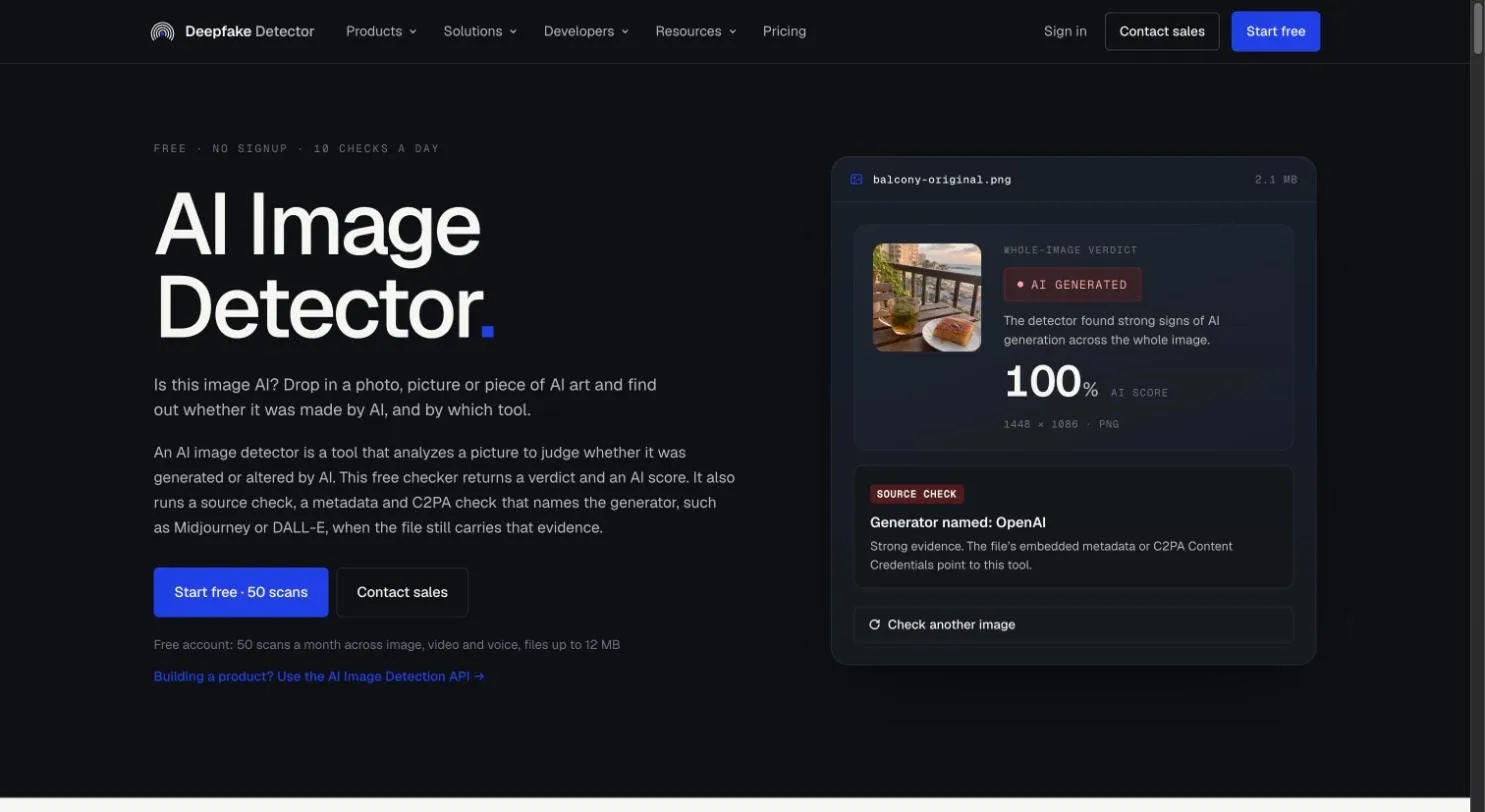
DeepfakeDetector.ai named OpenAI as the source of the original ChatGPT file
The score bands are honest about uncertainty. A score of 0 to 15 is Human, 16 to 49 is Likely Human, 50 to 85 is Likely AI, and 86 to 100 is AI Generated. The page tells you to treat the middle bands as a reason to look harder, which is the right advice for any detector. In my test, every image landed clearly at one end: 0% for both real photos and 100% for all three AI images.
It catches partial edits. The model scores inpainting, where AI replaces part of a real photo, separately from full generation and adds both to the score. That matters for face swaps and AI backgrounds, which a “was this whole image generated?” check can miss.
It covers more than images. The same site checks video and voice, and the paid plans add an API.
Pricing: free with no signup (10 checks a day), free account (50 a month), Starter $49 a month for 1,000 detections with API access, Business $199 for 5,000, Enterprise $599 for 20,000.
Best for: anyone who wants a free, clear answer plus proof of origin when the file still has it.
4. Deploy Detect (Hive): Best Second Opinion
Hive is one of the best-known names in AI content detection, and its free web detector now lives at deploy.com/detect under the Deploy Detect name. The old hivedetect.ai address sends you there.
It did well on pixels. Both real photos scored under 1%, the AI images scored between 77.7% and 99.9%, and it guessed the right generator for each one: Midjourney and GPT Image 2. That attribution comes from the pixels, so it works even when the metadata is gone.
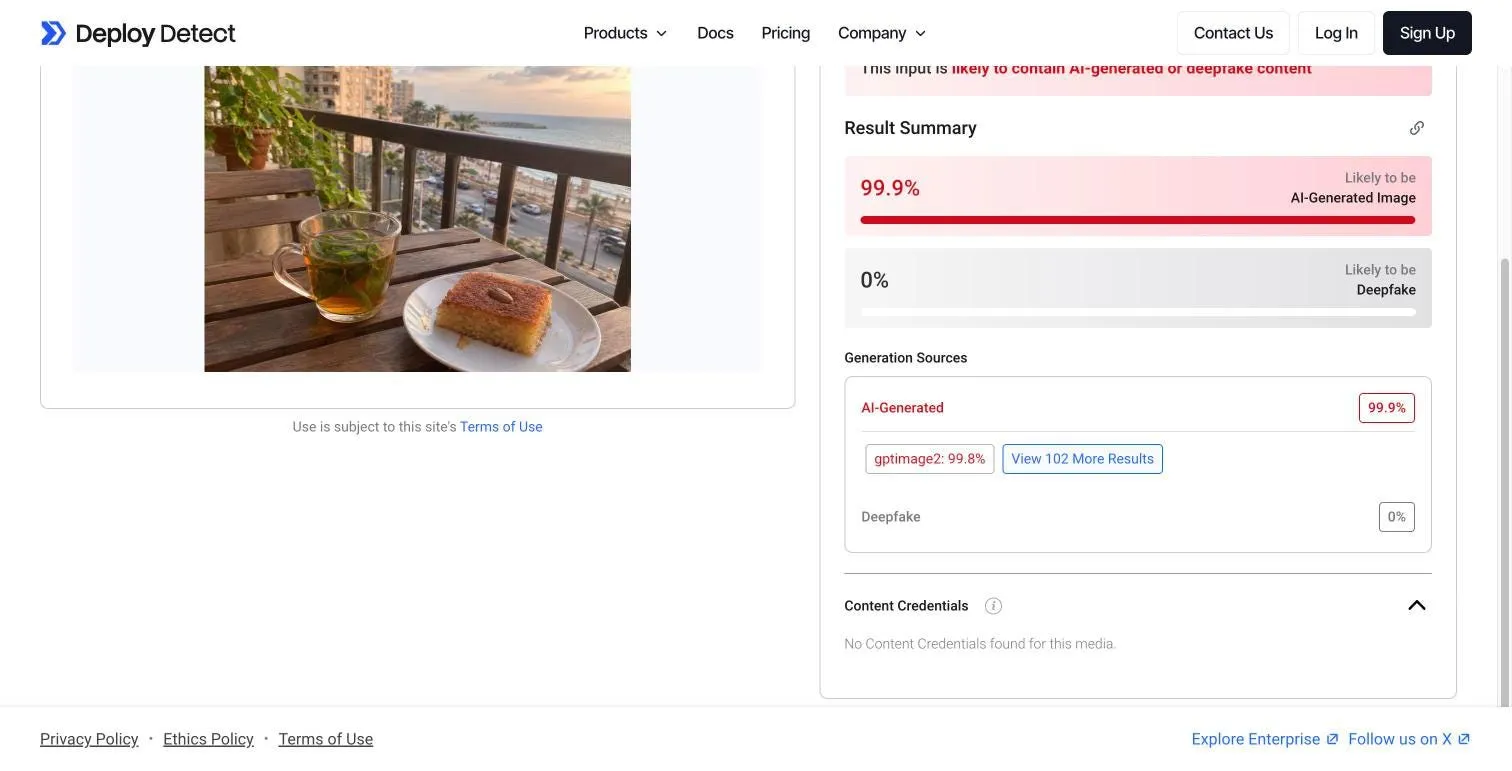
Deploy Detect scored the ChatGPT image 99.9% and guessed GPT Image 2, but found no Content Credentials
The weak spot was provenance. It has a Content Credentials section, but it reported “No Content Credentials found” on the original ChatGPT file, which definitely had them. So if you need to prove where a file came from, rather than just get a probability, this isn’t the tool for that part.
The other downside is pricing. The web tool was free when I used it and didn’t ask me to sign in, but the API pricing page lists the image classifiers as “Contact Sales.”
Best for: a second opinion when a result looks borderline, and a generator guess for an image with no metadata.
5. AI or Not: Cheapest Paid Plan
AI or Not is a popular name, but I couldn’t test it fairly. As soon as I uploaded an image, it opened a Create Account screen. I didn’t create one for this test, so I have no scores to report.
On paper, its pricing is the cheapest of the group: a free plan with 20 image checks, Pro at $5 a month for 500 image checks, and Business at $100 a month.
Best for: people who don’t mind signing up and want a low-cost monthly plan.
6. Watermark Checkers: SynthID and OpenAI Verify
Every tool above judges an image from evidence it finds. Watermark checkers work differently: they look for a hidden signal the AI company put into the image on purpose.
Google’s SynthID is the big one. Google opened SynthID Detector to the public on October 7, 2026. It’s free with a sign-in and reads SynthID watermarks from Google’s models plus partners, currently OpenAI, NVIDIA and Kakao. The same check is built into the Gemini app, so you can paste an image into Gemini and ask whether it was made with Google AI.
OpenAI has its own Verify tool, which checks an image for OpenAI’s SynthID watermark or its C2PA Content Credentials. It only answers one question: did OpenAI make this?
That’s the strength and the limit. A positive watermark result is close to proof. A negative one tells you almost nothing, because Midjourney, Stable Diffusion, Flux and most open-source models don’t add SynthID at all. My Midjourney test image, for example, would never show up in a watermark check. Use these as an extra check for Google or OpenAI images, not as a general detector.
7. What the Test Taught Me
Metadata only helps if you have the original. The ChatGPT file proved the point. The untouched PNG carried Content Credentials that named OpenAI. The re-saved copy of the same image carried nothing. That’s why a blank source check never means an image is real.
Not every tool reads the file the same way. Both detectors had a place for Content Credentials, but only DeepfakeDetector.ai actually found them in the original ChatGPT file.
Confidence varies even when the call is right. Both tools flagged the Midjourney image, but one said 100% and the other said 77.7%. A middle score isn’t a wrong answer, but it’s a reason to look closer.
Generator guesses are useful. Deploy Detect named the right generator for both AI sources from the pixels alone. That’s helpful context, but it’s still a guess. A named source from the file’s own credentials is stronger evidence.
8. How to Check an Image the Right Way
Here’s the process I’d use after this test:
- Find the original file if you can. Ask the sender for it, or download it from the first place it was posted. Screenshots and social uploads strip the evidence.
- Run it through DeepfakeDetector.ai. Read the verdict, the score band and the source check together.
- If the source check names a generator, you’re mostly done. A Content Credentials match from an AI tool is the strongest evidence you’ll get.
- If the score lands between 16 and 85, get a second opinion. Run the same file through Deploy Detect and compare.
- If you suspect Gemini or ChatGPT, check for a watermark. Ask Gemini or use SynthID Detector.
- Look at the image yourself. Hands, text on signs, reflections, shadows and background details that don’t add up are still worth a minute of your time.
- Never rely on one number for something important. For news, hiring, insurance or anything with real consequences, treat the detector as evidence, not a verdict.
9. Conclusion
The best AI image detector in 2026 isn’t just the one with the highest score. It’s the one that gives you enough evidence to make a decision.
For most people, that’s DeepfakeDetector.ai. It’s free without an account, it made the right call on every image I tested, it explains what its scores mean, and it’s the only tool here that read the file itself and named the generator. Deploy Detect also got every image right and is worth keeping as a second opinion, but it missed the Content Credentials on the original file.
And if you think an image came from Google or OpenAI, a watermark check is a useful extra layer on top of a detector.
FAQs
What is the best free AI image detector?
In my test, DeepfakeDetector.ai. It made the right call on all five images, gives 10 free checks a day with no account, and was the only tool that read a file's Content Credentials and named the generator.
Is there a free AI image detector with no signup?
Yes. DeepfakeDetector.ai gives 10 free checks a day with no account. Deploy Detect's web tool also worked without signing in when I tested it.
Can an AI image detector tell which AI made an image?
Sometimes. If the original file still has Content Credentials or generator metadata, DeepfakeDetector.ai's source check can name the tool, as it did with OpenAI in my test. Without metadata, some detectors, like Deploy Detect, guess the generator from the pixels.
Can a real photo get flagged as AI?
Yes. Polished photos with studio lighting, smooth colors and shallow focus can look like AI output to any detector. If a real photo gets flagged, check it with a second detector and look for the original file's camera metadata.
Do screenshots break AI image detection?
They break metadata checks, because a screenshot is a brand new file with no Content Credentials. Pixel-based detection and SynthID watermarks usually still work, though heavy cropping and repeated re-saving can weaken them.
How can I check if an image was made with Gemini or ChatGPT?
Ask Gemini whether the image was made with Google AI, or upload it to SynthID Detector, which reads Google's watermark and OpenAI's. For an original ChatGPT file, DeepfakeDetector.ai's source check can read the Content Credentials and name OpenAI, as it did in my test.